
INV-2041
Musterhandel GmbH · 14 Jun 2026
€1,248.90
ZUGFeRDXMLReady
Bring order and invoice data together in Maxmove and provide invoices as ZUGFeRD PDF or XRechnung XML, with a clear trail from completion to archive.
Invoice archive
Maxmove TMS
INV-2041
Musterhandel GmbH · 14 Jun 2026
€1,248.90
INV-2040
Hafenlogistik AG · 13 Jun 2026
€860.50
INV-2039
Schmidt & Co. KG · 12 Jun 2026
€2,150.00
Relevant service, recipient and amount data from completed transport orders forms the basis of the invoice.
Choose automatic, ZUGFeRD or XRechnung and add a buyer reference and routing ID when needed.
Invoices, corrections and available file formats remain traceable in the archive with their number, date and amount.
Clear for review and structured for processing: the readable ZUGFeRD PDF brings issuer, recipient, service details, references, tax lines and totals together in one document. The same content is also available as XRechnung XML when needed.
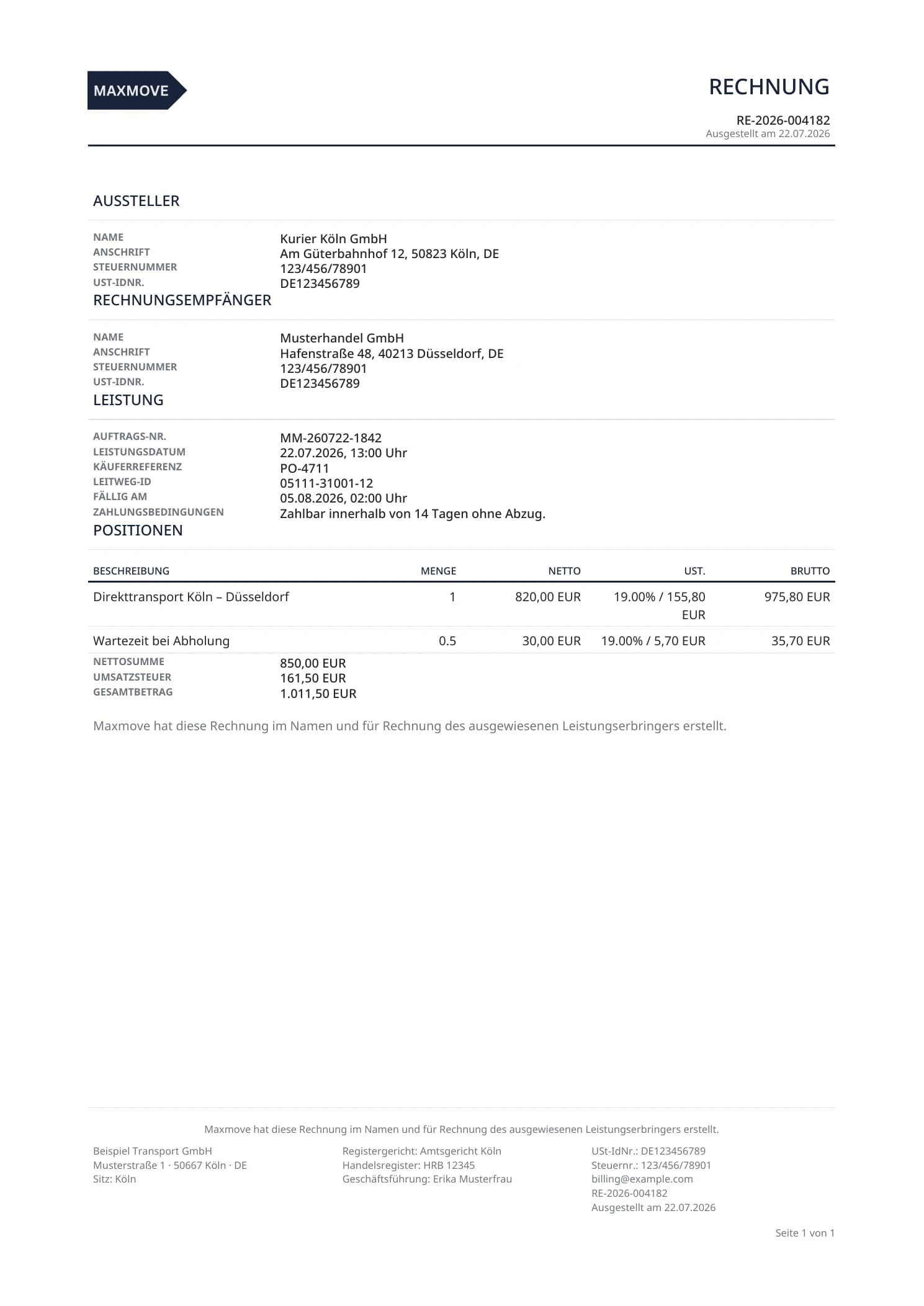
Define how invoice documents should be provided for each organization. Maxmove brings format preferences and recipient references together with the order.
ZUGFeRD PDF
People can read the document like a traditional invoice while structured XML data is embedded directly in the PDF.
XRechnung XML
The XML format provides machine-readable invoice content and can be downloaded separately from the invoice archive.
Routing ID
Routing IDs and buyer references are stored in the recipient's e-invoicing preferences and used when the document is produced.
Use ZUGFeRD PDF and XRechnung XML in your existing accounting and ERP workflows. Invoice data can be transferred by download, API or tailored exports to systems such as DATEV, SAP, Xero, Odoo, Sage or Zoho Books.
Availability and scope depend on the target system and your individual setup.


Connect e-invoices directly to your transport orders. Start with Maxmove TMS or discuss your billing workflow with our team.
Fill in an invoice in your browser and download it as PDF or XRechnung – no sign-up, for single trips and monthly statements.
Create an invoice for freeCreate invoices straight from delivered orders, record payments and issue credit notes – free on every plan.
Explore the invoicing softwareDeadlines 2025–2028, XRechnung vs. ZUGFeRD, Leitweg-ID and a five-step rollout plan inside your TMS.
Read the guide